
14 Best HIPAA-Compliant Online Fax Services in 2026
Most healthcare organisations still shop for fax the way they always have: find a HIPAA-compliant tool that …


The demo always goes well. A clean fax, every field extracted, one big accuracy number on screen. Then you go live, and the documents that actually eat your staff’s time arrive: skewed scans, handwritten forms, referrals with the key detail on page nine.
Day-one accuracy matters less than what comes next. When your team fixes a mistake, does the tool learn from it, or make the same mistake tomorrow?
This guide compares nine intelligent document processing (IDP) tools for healthcare and shows what each one does when it gets something wrong. It will be useful for hospitals, health systems, physician groups and the revenue cycle (RCM) companies who want to purchase an IDP tool.
What this guide covers:
Intelligent document processing in healthcare is software that works out what a document is, pulls out the fields that matter, and sends the result to the right place. It can tell a referral from an EOB or a lab result, read the patient name, member ID and dates, and write the data into your EHR or document system.
For a hospital or health system, that covers the fax and scan traffic that never stops: referrals, outside records, face sheets, prior authorization paperwork, payer letters and lab results.
Most tools follow the same path. A document arrives by fax, email, scan or upload. The software works out what type it is, reads the fields, checks them, and sends anything it is unsure of to a person. The rest is written into your EHR or document system. What differs between tools is mostly what happens after that last step.
OCR turns the image of a page into text. It does not know what the text means, so a referral and a bill look the same to it, and a template built for one sender’s layout breaks when another sender’s arrives. IDP adds the understanding on top. It classifies the document, finds specific fields wherever they sit on the page, scores how sure it is, and passes the result to the next system. Many IDP tools use OCR as their first step.
A hospital takes in documents from hundreds of referring practices, outside facilities and payers, each with its own layout. A tool tuned to a handful of standard templates handles the easy ones and stumbles on the rest. The same is true for an RCM company that processes documents for many clients. The odd documents are the ones that cost your team the most time, so what matters is whether the tool gets better on them over time.
Ask every vendor these five questions. They matter for any organization that gets documents from many different senders, whether that is a hospital taking referrals from outside practices, a health system with many sites, or an RCM company working for many clients.
Ask whether the tool learns from your documents only, or from every customer’s mixed together. A shared model gets good at the documents everyone sends. A model of your own gets good at the odd ones your referring practices, payers and partners send, which are the ones that cost your team the most time.
If a correction never reaches the model, your team will fix the same mistake on the same kind of document again and again. If retraining only happens when someone presses a button, ask who does it and how often.
A retrained model can improve overall but get worse at one field, such as member IDs. The overall score will not show it, but your denials will. Ask what a new version has to pass before it replaces the current one.
If the tool suddenly starts getting one sender’s documents wrong, you need to know which corrections caused it. Without that, all you can do is go back to an older version and hope.
Straight-through means a document goes into your system with no human review. It only saves time if you decide how confident the tool has to be first. You know which document types can live with an occasional miss and which cannot.
Dexit is 314e’s AI document processing platform with HIPAA Cloud Fax capabilities, built for healthcare. It classifies documents and extracts fields from day one of onboarding, because its model, DextractLM, comes pre-trained on healthcare documents. You do not have to feed it training data before it starts working. Your team’s corrections then make it better on your own documents.
Whose model: Each customer, or tenant, gets its own deployed model, covering both identifying the document type and extracting the fields. For a hospital or health system, that one model covers every department and workflow you run through it. For an RCM company, it covers every workflow it runs for its clients. Once the model retrains, the fix your team made on a face sheet in one workflow carries over to the next workflow that receives the same kind of document.
What a correction does: Corrections made in normal review retrain that model automatically, in the background, whether your reviewer fixes an extracted field or changes the document type. Nobody presses a train button. In Dexit’s own words, “Every correction your team makes feeds back into the model” and “As the model retrains on reviewer feedback, accuracy climbs over time”.
What stops a worse model: A retrained version cannot go live if it is worse than the current one on any single extracted field, or at recognizing any single document type. If the new version reads member IDs worse, or starts mistaking EOBs for referrals, it does not ship, however much better its overall number looks. A built-in monitoring agent also watches the pattern of feedback and alerts the admin when it looks off, so time is not wasted retraining on it.
Tracing: Every model version traces back to the corrections that produced it.
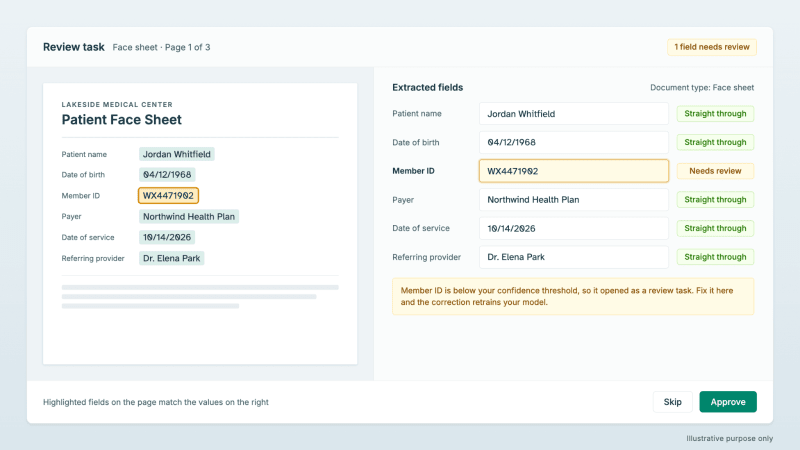
Straight-through: You set the confidence threshold. Extractions above it go straight through, and the rest open as a review task with each field shown next to the original page.

Tennr is healthcare-native AI that classifies and routes patient data arriving by fax, portal or internal order, built around a purpose-built model it calls RaeLM. It sells to DME (durable medical equipment) suppliers, infusion providers, specialty pharmacies, physician groups, fertility clinics and health systems, all fax-heavy intake operations.
Whose model: Tennr’s public pages do not describe per-customer models. Its privacy policy says it uses de-identified data “to refine our algorithms and machine learning applications.” That describes how Tennr improves its models in general. It does not say whether your documents train a model that belongs to you.
What a correction does: Tennr does not publicly document whether corrections retrain the model.
What stops a worse model: Not publicly documented.
Tracing: Not publicly documented.
Straight-through: Tennr’s Autopilot “completes high-confidence work automatically while maintaining built-in quality control.” The page describes this at the level of the task. It does not describe a confidence score per field.
Ask: Is the model trained on our documents, and do our corrections change it?
Notable is a healthcare automation platform with intelligent document processing that integrates with each health system’s infrastructure “via SFTP, HL7, and FHIR”, with Epic, Oracle and Athena among the systems its IDP page lists.
Whose model: Not publicly documented.
What a correction does, and what stops a worse model: Notable answers both in one passage, and it is worth reading whole: “Rather than allowing the AI to update itself automatically without supervision, we have a managed improvement process … The models are only updated after our team reviews staff corrections to derisk the model learning incorrect behavior”.
That is a direct answer to the risk of a model training in a bad week. Notable’s guard is a human review by its own team before a model updates. Dexit’s is the automated per-field check described above. Both are deliberate choices, and they trade speed of improvement against who does the checking.
Tracing: Not publicly documented.
Straight-through: Low-confidence documents are flagged for staff review, and staff “validate or correct specific fields” before the data is exported.
Ask: How long does it take from a staff correction to a model update?
Nanonets is a general document AI platform with a healthcare offering.
Whose model: Its own training flow has you train and retrain a model on your approved files, which implies a model per customer. Nanonets does not state it in those words.
What a correction does: An auto-training option exists. The same document references are blunt about when to use it: “Use Automatic Training only if approved files are 100% correct and doubly verified,” and if you are unsure, they recommend adding files manually instead.
What stops a worse model: Not publicly documented.
Tracing: Not publicly documented.
Straight-through: Every prediction in the API carries a confidence score between 0 and 1, and Nanonets recommends setting the threshold “at around 0.8.”
Ask: Should we turn auto-training on, and what checks a retrained model before it goes live?
Docsumo is a document AI platform with healthcare use cases, built around custom models you train yourself.
Whose model: Your own, trained from “a minimum of 20 confirmed documents”.
What a correction does: Documents your reviewers confirm become training data, and retraining happens through an explicit “Train New model” step. A correction improves the model when someone runs that step. For a hospital IT team, an HIM department or an RCM team, that makes retraining a task on someone’s list, and the model gets better as often as that person gets to it.
What stops a worse model: Not publicly documented.
Tracing: Not publicly documented.
Straight-through: Every field carries a confidence indicator, a green tick or a yellow eye icon, so your reviewer knows which fields to look at.
Ask: Who presses the train button, and how often? Is it realistic for our team to own the training?
Hyperscience is enterprise document automation sold across industries, healthcare is one among them, with a vision-language model called ORCA at its center.
Whose model: Custom training on your documents. ORCA extracts out of the box without training, and a specialized ORCA model trained on your documents needs at least 120 annotated documents.
What a correction does: Hyperscience does not publicly document automatic retraining from corrections.
What stops a worse model: Not publicly documented.
Tracing: Not publicly documented.
Straight-through: Accuracy targets drive how much is automated. Hyperscience’s docs are precise that its confidence score “is not an accuracy percentage or a direct probability”. That is a useful warning when reading any vendor’s confidence score: a score of 0.9 is not always a 90% chance the field is right, so ask what each vendor’s score is calibrated against.
Ask: How many reviewed documents does it take before our accuracy targets calibrate?
ABBYY Vantage is an enterprise IDP platform built on pre-trained “skills”.
Whose model: Vantage’s skills retrain on your team’s corrections. Its docs describe this per skill and do not say more about whose model it is.
What a correction does: Online Learning retrains Document and Classification skills in real time using operator corrections made during manual review. It depends on the setting. If the system administrator has disabled training, corrections do not improve future processing.
What stops a worse model: Not publicly documented.
Tracing: Not publicly documented.
Straight-through: Not publicly documented.
Ask: Is Online Learning switched on in our tenant, and will you sign a BAA for Vantage?
Hyland sells OnBase, an enterprise content-management platform used in healthcare, with an intelligent document processing layer on top.
Its distinct strength is that it is a full records system. OnBase covers “secure retention and destruction of your documents and records,” its records management places holds, and it offers a SMART on FHIR integration with Epic Hyperdrive. That makes it a natural fit for hospitals that already run OnBase as their document system.
Whose model: Not publicly documented.
What a correction does: Hyland’s IDP page describes “human-in-the-loop verification options.” It does not say that those corrections retrain the model.
What stops a worse model: Not publicly documented.
Tracing: Not publicly documented.
Straight-through: Not publicly documented.
Ask: What does the IDP layer do with our corrections?
The last option is to build custom extractors on Google Document AI, AWS Textract or Azure Document Intelligence and run the review loop yourself.
Whose model: Your own, and from small samples. Azure trains a custom model from “five examples of the same form” (Azure custom models). AWS adapters train from five samples, and a Google custom model from 10 to 100 or more documents.
What a correction does, what stops a worse model, and tracing: All three are yours to build. And the review layer got harder to build on. Google deprecated Document AI’s Human in the Loop on January 16, 2024. AWS says Amazon A2I “is no longer open to new customers.” Azure’s documentation advises adding your own human review stage. Google’s Healthcare Natural Language API was deprecated on May 27, 2025 and shut down on May 27, 2026.
Straight-through: All three return confidence scores: Google from zero to one, AWS from 0 to 100, and Azure as “an estimated probability between 0 and 1.” The routing that acts on the score is yours to build.
Ask your own team: Who builds the review screen and the retraining loop, and who owns them a year from now?
Here are the nine tools against the five questions. “Not documented” means the vendor’s public pages do not say, not that the tool cannot do it.
| Tool | Your own model | Correction retrains | Check before a new model goes live | Traceable to corrections | You set straight-through |
|---|---|---|---|---|---|
| Dexit | Yes | Yes, automatically | Yes, per field and per document type | Yes | Yes |
| Tennr | Not documented | Not documented | Not documented | Not documented | Documented: Autopilot for high-confidence work |
| Notable | Not documented | Documented: after Notable's team reviews corrections | Documented: human review by Notable's team | Not documented | Documented: low-confidence documents flagged |
| Nanonets | Implied by its training flow | Documented: auto-training option, manual recommended | Not documented | Not documented | Documented: 0 to 1 score, about 0.8 suggested |
| Docsumo | Documented: from 20 confirmed documents | Documented: explicit train step | Not documented | Not documented | Documented: per-field confidence indicator |
| Hyperscience | Documented: custom training, 120 documents | Not documented | Not documented | Not documented | Documented: accuracy targets |
| ABBYY Vantage | Documented: skills retrain on your corrections | Documented: Online Learning, admin can disable | Not documented | Not documented | Not documented |
| Hyland | Not documented | Not documented (verification is) | Not documented | Not documented | Not documented |
| Build your own | Yours, from small samples | Yours to build | Yours to build | Yours to build | Scores returned, routing is yours to build |
Remember the big number on the demo screen? Every vendor that publishes one measures something different. Each figure below is the vendor’s own.
Dexit has 95%+ extraction accuracy across healthcare document types. Docsumo’s homepage cites “99% field-level accuracy”. Hyperscience says customers “regularly achieve 99.5% accuracy and 98% automation.” Notable describes a health system whose referral-to-transcription turnaround fell from 48 hours to 10 minutes, which is a speed result, not an accuracy one.
Four numbers, four different measures, and no way to line them up. So skip the comparison. Run a pilot on your own hardest documents, such as the worst face sheets, outside records and the paper EOBs that take longest to key, and ask every vendor for the results by field rather than as one overall score. One overall score can look good even when the tool is bad at reading one important field, such as member IDs.
Pick on what happens when the tool gets something wrong, not on the demo or the headline number. A demo shows a tool on its best day. What matters is how it behaves on your own documents three months in.
Two things only work as a pair: a tool that learns from your team’s corrections, and a check on what it has learned before the new version goes live. Learning without a check can train in a bad week and ship it. A check that waits on a person is safer, but then the tool improves only as fast as that person works.
So the question from the top still stands: when your team fixes a mistake, does the tool learn from it, and what stops it from learning the wrong thing?
Explore Dexit, intelligent document processing with HIPAA cloud fax, built for hospitals, health systems and RCM teams.
Join over 3,200 subscribers and keep up-to-date with the latest innovations & best practices in Healthcare IT.
Most healthcare organisations still shop for fax the way they always have: find a HIPAA-compliant tool that …

Healthcare information leaders today are caught between two pressing realities - an unprecedented surge in …


Health Information Management (HIM) teams play a vital role in healthcare operations, ensuring that critical …